AI field operations for electrical contractors

From field work toCompany performance.

VoltLayer captures work as it happens in the field, connects approved evidence to jobs, phases, reports, and existing systems—creating a governed view across your operation.

AI as your Field Companion. Company Back Office.

Why we exist · How we work · What we deliver
Why

Our core purpose

The field creates the truth. Disconnected systems hide it.

Field updates get buried in emails, entered twice, or shared too late. VoltLayer connects them to the jobs and workflows your team relies on.

How

Our approach

Capture once. Connect the operation.

VoltLayer AI connects approved field evidence to the right job, phase, crew, and workflow.

01

Capture the Work

Voice · Photo · Video · Text

02

Connect the Context

Job · Phase · Crew · Task

03

Review & Approve

Confirm · Correct · Approve

04

Act with Context

Reports · KPIs · Workflows · Decisions

What

What you get

One connected operating layer. from field to office.

Two connected work surfaces turn field activity into operational visibility.

AI Field Companion

Capture work as it happens.

Voice · Photo · Video · Text

Workers and field leaders capture work, evidence, tasks, and updates through voice, photo, video, and text. Volter prepares each update for review.

Explore the Field Companion
Company Back Office

Turn approved field activity into operational visibility.

Jobs · Phases · Reports · KPIs

Authorized teams manage operational context and review approved activity, reports, productivity KPIs, and performance in one connected workspace.

Explore the Back Office

VoltLayer AI connects the two—linking approved field evidence to the right job, phase, crew, and workflow.

FROM FIELD CAPTURE TO OPERATIONAL REVIEW

One update. Multiple outcomes.

CAPTURE → ORGANIZE → APPROVE → ACT

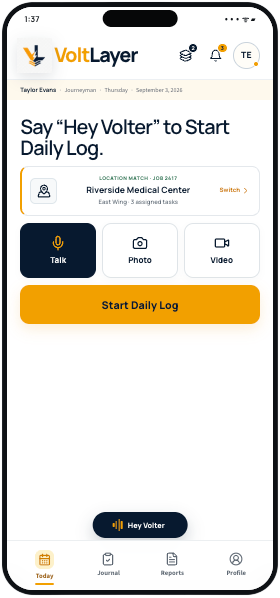
01Start the Daily Log
VoltLayer Field Companion prototype showing a job-matched Start Daily Log screen with Talk, Photo, and Video controls.
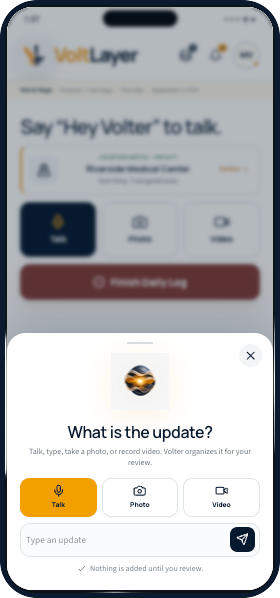
02Capture the update
VoltLayer Field Companion prototype showing the What is the update capture sheet with Talk, Photo, Video, and text options.
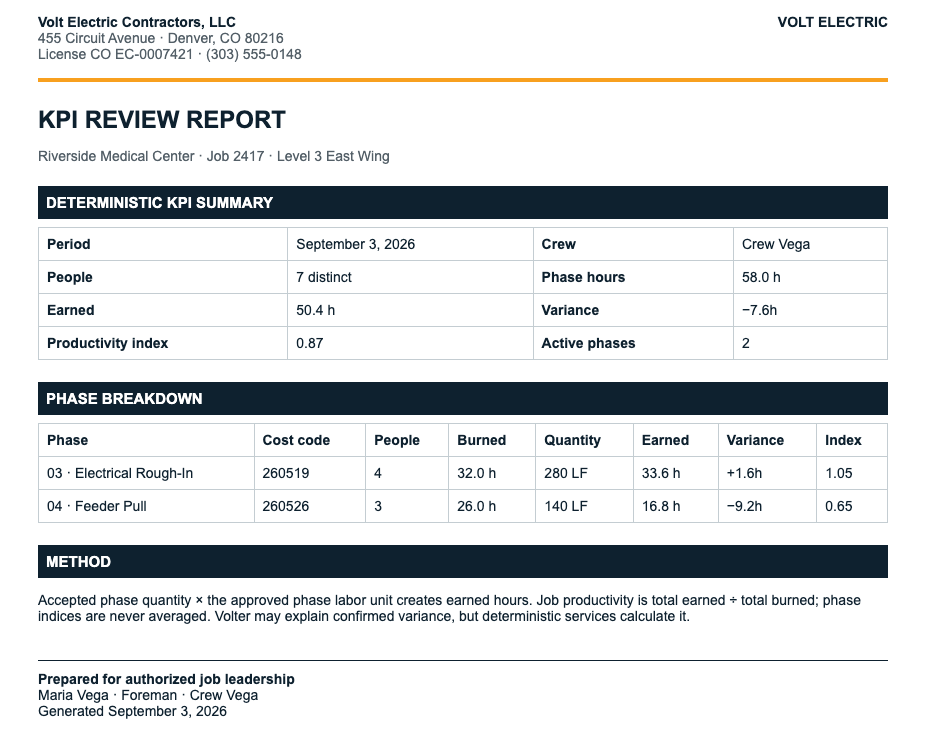
03Review the KPI output
VoltLayer KPI Review Report showing crew, phase hours, earned and burned hours, variance, productivity index, and phase breakdown.

VoltLayer AI organizes. Your team approves.

Human-reviewed · Source-linked · Permission-controlled · Recency-tracked

Security & Data Governance
Built for your existing stack

Designed to connect withthe systems you already use.

Bring field updates into the tools your team already uses—from project management and scheduling to accounting.

Project management

Jobs · Documents · RFIs · Project Context

Scheduling & crews

Crews · Labor · Schedule Context

Email & messaging

Email · SMS · Communication

Field & estimating

Drawings · Estimates · Field Systems

Accounting & billing

Costs · Billing · Financial Context

Custom APIs

Contractor-specific systems

Conest
Conest
QuickBooks
QuickBooks
Raken
Raken
Sage Intacct
Sage Intacct
Google Workspace
Google Workspace
Procore
Procore
Autodesk Construction Cloud
Trimble Connect
Trimble Connect
Fieldwire
Fieldwire
PlanGrid
PlanGrid
Bluebeam
Bluebeam
Conest
Conest
QuickBooks
QuickBooks
Raken
Raken
Sage Intacct
Sage Intacct
Google Workspace
Google Workspace
Procore
Procore
Autodesk Construction Cloud
Trimble Connect
Trimble Connect
Fieldwire
Fieldwire
PlanGrid
PlanGrid
Bluebeam
Bluebeam

No rip-and-replace. No data silos. VoltLayer fits your existing workflow.

Built with design-partner input

See VoltLayer in action.

Walk through a live user journey with one of our architects. No slides — just VoltLayer running your workflows.

Book a Demo
💬 Chat with Volter